Benchmark · 130 logos · default settings
Crisp Vector vs Vector Magic vs Recraft
I took 130 real brand logos, added the same pixel noise, colour drift and JPEG artefacts that AI image generators leave behind, and ran every file through all three tools on default settings. Then I measured each output SVG straight against the original artwork.
Results
- logos where Crisp Vector’s SVG was closer to the original than Vector Magic’s
- 123/130
- logos where it was closer than Recraft’s
- 125/130
- lower average error than Vector Magic (3× lower than Recraft)
- 9×
- fewer points than Vector Magic (27% fewer than Recraft)
- 39%

 Crisp Vector
The open box stays open.

 Vector Magic
A white diamond painted in the middle.

 Recraft
A white diamond painted in the middle.
The three tools side by side
What each tool costs, what licence you get on the output, and how clean the SVG actually is when you open it. Scroll down to inspect the raw files side by side.
| Crisp Vector , Free | Vector Magic | Recraft | |
|---|---|---|---|
$0 Free SVG download. No card, no sign-up. | $9.95 per month to download. Desktop edition $295 once-off. | $12 per month to own the file. Free plan is public, 3 uploads per day. | |
| Upload a logo | |||
| Getting your file | |||
| Download the SVG for free | Included | Limited: Preview only | Limited: Free plan: 3 uploads per day |
| No account needed | Included | Limited: To preview. Downloading needs one. | Not included |
| No payment details needed | Included | Card or PayPal, to download | Limited: Free plan only |
| Yours to use commercially And kept out of public view. | Included | Limited: Once subscribed | Limited: Paid plans only. Free-plan images are Recraft’s, and public. |
| The file you get | |||
| Background removed On default settings. | Included | Kept as a shape | Kept as a shape |
| Holes are holes Letter counters and gaps show whatever is behind them. | Included | Painted in the background colour | Painted in the background colour |
| Shading kept as gradients On the shaded logo in the Shading test. | Included | Bands of flat colour | Limited: Gradients, with seams |
| Average error Against the original artwork, over 130 logos. Lower is better. | 1× (lowest) | 9.3× Crisp Vector’s | 3.0× Crisp Vector’s |
| Points across all 130 files Fewer is lighter and easier to edit. | 30,871 | 50,557 | 41,989 |
| Export formats | SVG | SVG, EPS, PDF. AI and DXF on desktop. | SVG, PDF, PNG, JPG, TIFF, Lottie |
| Beyond conversion | |||
| Edit the result in the tool | Not included | Limited: Segmentation editor | Included |
| Generate new artwork | Not included | Not included | Included |
| Works offline | Not included | Limited: Desktop edition, $295 | Not included |
| For developers | |||
| Public API | On Replicate | Not included | Recraft API, Replicate |
| Per 1,000 logos | About $0.25 | Not included | $10.00 |
- Prices in US dollars, from each vendor’s own pages on 2 October 2026.
- File results come from my 130-logo benchmark with every tool on default settings. Vector Magic and Recraft can both remove a background if you do it manually, though neither does it by default.
- Crisp Vector’s API cost is just Replicate’s CPU rate: $0.0001 per second, averaging about 2.5 seconds per logo in my tests. How to call the API.
Price
If you just need one logo for your website or a print run, here is what that single download costs on each tool’s site, alongside what 1,000 conversions cost over an API.
One logo
On each tool’s own website, licensed for commercial use.
- Crisp Vector $0
Upload it and download the SVG. No card, no account, no watermark.
- Vector Magic $9.95
The preview is free. Downloading needs a monthly subscription, which renews until you cancel it.
- Recraft $12
One month of the Basic plan. On the free plan your images belong to Recraft, show up in its public gallery and aren’t licensed for commercial use.
1,000 logos through an API
For print shops, platforms and anyone else converting in bulk.
- Crisp Vector about $0.25per 1,000 logos
- Vector Magic No public API
- Recraft $10.00per 1,000 logos
That’s 40 times cheaper than Recraft’s API. Crisp Vector runs on Replicate and you only pay for CPU time. No plan, no minimum.
How to use the APIHow I worked out the price · Replicate CPU (4 vCPU, 8 GB) at $0.0001/s × about 2.5 s per logo × 1,000 = about $0.25. Measured 2 Oct 2026: the ten case-study logos in one batch billed 24.6 s. Larger, busier logos take longer: one single-logo run in that test billed 4.2 s, which comes to $0.42 per 1,000 at that pace. Recraft: 10 API units per logo at $1 per 1,000 units, $10.00 per 1,000 logos, the same rate on Replicate. Sources, all checked 2 Oct 2026: Vector Magic pricing, Recraft plans, Replicate hardware, Crisp Vector model.
Removing the background
Your logo isn’t always going to sit on white. To test how usable each output is, I deleted the outer background shape from every tool’s SVG, which is the first thing you’d do in Illustrator or Figma, and placed the result on dark and coloured surfaces.
 Crisp Vector
The open box stays open.
- Vector Magic
A white diamond painted in the middle.
- Recraft
A white diamond painted in the middle.
The space in the middle of the Dropbox box is negative space: the background showing through. Both Vector Magic and Recraft paint it as a white diamond, so on any non-white background the logo carries a white patch. Crisp Vector leaves it empty. It also draws the whole mark in 27 points (straight lines but for one curve), against 91 for Vector Magic and 127 for Recraft.
Colour
AI images add noise to every flat colour, and a tracer has to tell that noise apart from a real second brand colour. When it gets that wrong, two blues turn into one, or one blue turns into six.
Only Crisp Vector kept both Looker’s five colours and its round holes.

Input pixels

Original artwork
 Crisp Vector
 Vector Magic
 Recraft
| Colour | Red | Yellow | Green | Blue | Grey |
|---|---|---|---|---|---|
| Original artwork | #ea4335 | #fbbc04 | #34a853 | #4285f4 | #5f6368 |
| Crisp Vector All five colours kept, each within 2 levels of the brand value. | #eb4234 1 off | #fbba04 2 off | #36a853 2 off | #4183f3 2 off | #606268 1 off |
| Vector Magic Red and yellow merged into one orange, and the green ring came out grey. | #f17022 merged | #f17022 merged | #5f6467 merged | #4183f3 2 off | #5f6467 merged |
| Recraft Colours kept, but the green ring’s round hole became a lumpy teardrop. | #ec4137 2 off | #fcbc02 2 off | #35a954 1 off | #4183f3 2 off | #616367 2 off |
The Looker mark has five flat colours, three of them in small arcs only a few dozen pixels across. Vector Magic merged the red and yellow arcs into a single orange and drew the green ring grey: three colours where the brand has five, and the mark no longer reads as Google’s palette. Recraft kept the colours but squashed the green ring’s round hole into a lumpy teardrop. Crisp Vector returns all five colours within 2 levels (out of 255) of the brand values, with round holes and true transparency.
The table scrolls sideways for every colour. “Off” is the biggest difference on any one channel, in levels out of 255. Two or three levels is invisible, and the noise in the input is far bigger than that.
Shapes and points
Straight edges should be straight lines, circles should be four-point circles, and a corner should be one sharp anchor. The fewer points a file has, the easier it is to edit and the lighter it is to load.
The X is all straight lines, so it only needs 16 anchors.
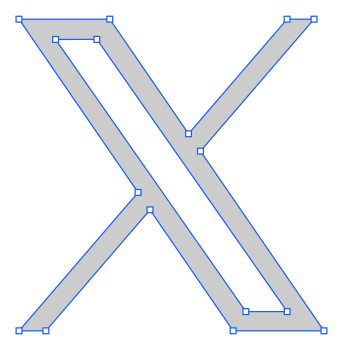 Crisp Vector
16 anchors · 0 handles
16 points in all, anchors plus handles.
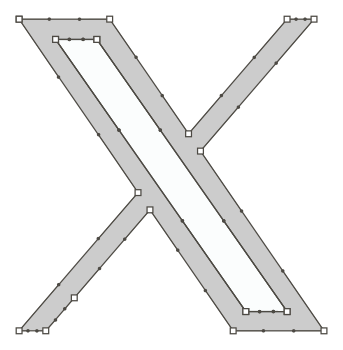 Vector Magic
22 anchors · 42 handles
64 points in all, anchors plus handles.
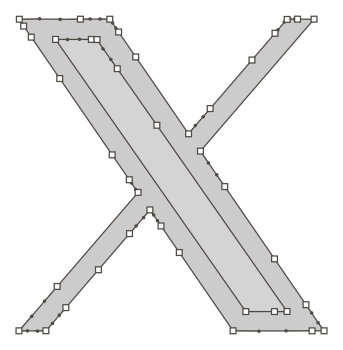 Recraft
46 anchors · 40 handles
86 points in all, anchors plus handles.
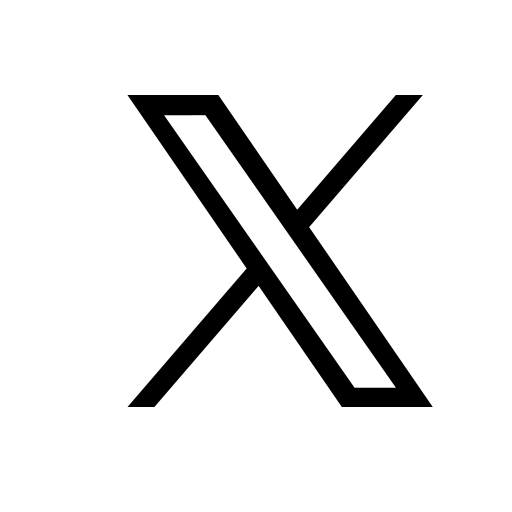
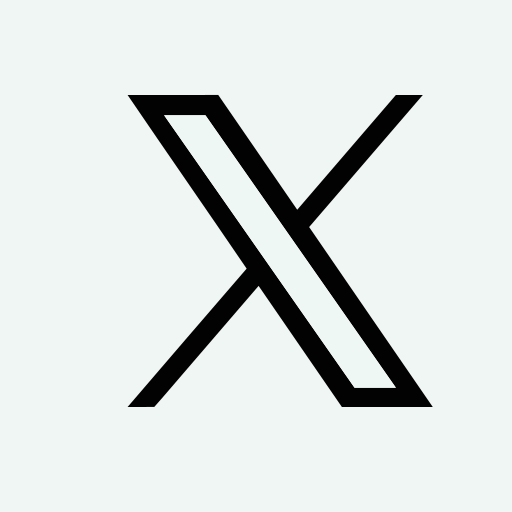
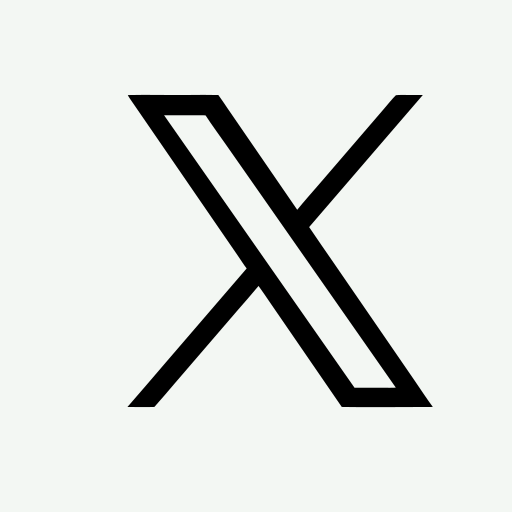
The X mark is all straight edges. Crisp Vector writes it as 16 anchors joined by straight line segments: zero Bézier handles, 16 points in total. Vector Magic needs 64 points (it writes straight edges as curves), and Recraft needs 86. Delete the background, put the logo on a coloured page, and the difference becomes obvious: in both rival files the inner stroke of the X is an off-white painted shape, not a hole.
Outlines show each file with its background shape deleted. Counts leave out Vector Magic’s background-coloured shapes and include Recraft’s background rectangle, as the benchmark does.
How Crisp Vector draws the X logo
Lines are lines
The contour is split at corners. Each run between corners becomes a straight line whenever one fits within tolerance, otherwise as few cubic Béziers as the tolerance allows. The learned straight-edge predictions push borderline runs to lines, and refinement keeps lines as lines: their handles are not free parameters.
Background removed, holes are holes
The background is modelled from the image border (solid, gradient or soft texture) and treated as a label of its own during unmixing. Background-coloured regions enclosed by the mark become real holes in the path (even-odd subpaths), not shapes painted in the background colour. The SVG works on any background.
Sub-pixel corners
The corner model predicts tips with sub-pixel offsets, so the sharp ends of the strokes sit where the design has them, not where the anti-aliased raster clips them.
Shading
AI image generators often add soft gradients and subtle shading. A flat-colour tracer has to slice every fade into solid bands, which leaves visible step lines across the artwork.
Only Crisp Vector kept the Kolibri logo’s shading smooth and its shapes clean.

kolibri.png · the input
Made with ChatGPT, lightly shaded, on plain white.
 Crisp Vector
Smooth gradients in clean shapes. The wing’s shadow keeps its fade.
 Vector Magic
Every gradient turned into a stack of flat bands, like contour lines.
 Recraft
Real gradients, but a seam runs through the wing and its shadow comes out flat.
Look closer
The loupe starts on the wing’s shadow, where the shading is deepest. Each window is the SVG itself, magnified 3 times, so what you see is what’s in the file.

Tap the logo, or drag sideways across it, to look anywhere.Move your pointer over the logo, or focus it and use the arrow keys (Shift for bigger steps).
- Input pixels
- Crisp Vector
- Vector Magic
- Recraft
| Measure | Crisp Vector | Vector Magic | Recraft |
|---|---|---|---|
| Colour error Average difference from the PNG, out of 255 | 2.8 | 3.2 | 5.6 |
| Banding Share of the logo with an edge the PNG doesn’t have | 0.01% | 7.4% | 0.37% |
| Shapes A shape holding several gradients counts once | 12 | 75 | 23 |
| Gradients Real SVG gradients in the file. 7 of Crisp Vector’s are near-flat letter fills. | 14 | 0 | 6 |
| File size The SVG as it came out | 11.2 KB | 72.2 KB | 14.9 KB |
Every tool got the same PNG and ran on its default settings. I rendered each SVG at the PNG’s size and compared the two pixel by pixel. Vector Magic keeps the white square behind the logo, which counts as one of its shapes. Download each file as it came out: Crisp Vector, Vector Magic, Recraft.
Vector Magic’s colours are close pixel by pixel, but it gets there with 75 flat shapes, 7.4% of the logo crossed by band edges, and a file 6.4 times the size of Crisp Vector’s. Recraft writes gradients too, but its colour error is 2.0 times Crisp Vector’s: a seam runs through the upper wing, and the wing’s shadow comes out one flat purple.
How Crisp Vector rebuilds shadingHow I measured
I picked the examples above because the differences are easy to see. The numbers here cover all 130 logos, including the ones where Crisp Vector loses.
- Crisp Vector 1.0×
- Vector Magic 9.3×
- Recraft 3.0×
- Crisp Vector 30,871
- Vector Magic 50,557
- Recraft 41,989
Than Vector Magic 123/130
Than Recraft 125/130
Than both at once 118/130
Every logo as a dot
Each dot is one logo. Below the diagonal, Crisp Vector’s file is closer to the original than the other tool’s, and the further below, the bigger the gap. Hover or tap a dot to see which logo it is, or focus a plot and use the arrow keys. Each step on an axis is ten times the error.
- Crisp Vector closer
- Vector Magic closer
- Crisp Vector closer
- Recraft closer
| Logo | Crisp Vector | Vector Magic | Recraft |
|---|---|---|---|
| x | 0.00071 | 0.01401 | 0.05460 |
| webflow | 0.00099 | 0.00392 | 0.02349 |
| threads-icon | 0.00211 | 0.04113 | 0.00338 |
| looker | 0.00520 | 0.10209 | 0.01475 |
| dropbox | 0.00279 | 0.02253 | 0.00319 |
| mesos | 0.00294 | 0.00918 | 0.01106 |
| fetch | 0.00031 | 0.00255 | 0.00355 |
| retool | 0.00240 | 0.00471 | 0.01156 |
| chargebee | 0.00269 | 0.00668 | 0.11304 |
| couchdb | 0.01140 | 0.13646 | 0.02146 |
| nextjs | 0.00617 | 0.07423 | 0.00968 |
| brandfolder-icon | 0.00305 | 0.01936 | 0.00849 |
| importio-icon | 0.00152 | 0.00102 | 0.02167 |
| neo4j | 0.00587 | 0.11949 | 0.01524 |
| lufthansa | 0.02109 | 0.28291 | 0.03966 |
| copyleft | 0.00100 | 0.01644 | 0.00114 |
| observablehq | 0.00169 | 0.02217 | 0.00457 |
| resend-icon-dark | 0.00037 | 0.01049 | 0.00901 |
| cerebras | 0.00653 | 0.04884 | 0.01200 |
| loader | 0.00086 | 0.00087 | 0.01007 |
| bitrise-icon | 0.00291 | 0.02160 | 0.05580 |
| nx | 0.00161 | 0.01089 | 0.00485 |
| amd | 0.00363 | 0.09244 | 0.00587 |
| nomad-icon | 0.00270 | 0.02163 | 0.00419 |
| anthropic | 0.00593 | 0.23209 | 0.02095 |
| cerebras-icon | 0.00191 | 0.02911 | 0.00662 |
| sony | 0.01023 | 0.20143 | 0.01847 |
| microsoft-icon | 0.00357 | 0.00605 | 0.00708 |
| amazon-connect | 0.00438 | 0.05577 | 0.01435 |
| lightstep | 0.02145 | 0.40516 | 0.05397 |
| glimmerjs | 0.00039 | 0.00227 | 0.00950 |
| sass | 0.00452 | 0.00432 | 0.01111 |
| hashnode | 0.00359 | 0.02280 | 0.08751 |
| nuclide | 0.00681 | 0.02951 | 0.02348 |
| asana-icon | 0.00016 | 0.00684 | 0.01494 |
| stimulus-icon | 0.00369 | 0.03440 | 0.00509 |
| braze | 0.00179 | 0.06346 | 0.00781 |
| svgator | 0.01353 | 0.28704 | 0.02394 |
| codex | 0.00312 | 0.00683 | 0.00993 |
| coursera | 0.00365 | 0.08939 | 0.09317 |
| subaru | 0.01097 | 0.09828 | 0.01758 |
| stylex-icon | 0.00698 | 0.05519 | 0.01472 |
| cucumber | 0.00191 | 0.02727 | 0.00342 |
| vimeo | 0.00274 | 0.05513 | 0.00879 |
| drone-icon | 0.00203 | 0.00272 | 0.02597 |
| qwen-icon | 0.00022 | 0.00620 | 0.00855 |
| rancher-icon | 0.00228 | 0.06331 | 0.00367 |
| mem0-icon | 0.00279 | 0.01254 | 0.01122 |
| drupal-icon | 0.00063 | 0.01477 | 0.00212 |
| openapi | 0.00365 | 0.06375 | 0.00855 |
| java | 0.00547 | 0.09388 | 0.00925 |
| drupal | 0.00291 | 0.00937 | 0.01927 |
| anthropic | 0.01000 | 0.05777 | 0.02250 |
| kafka | 0.01412 | 0.08734 | 0.03036 |
| freedcamp | 0.01410 | 0.02935 | 0.04875 |
| solr | 0.00545 | 0.07208 | 0.00920 |
| fomo | 0.00670 | 0.04035 | 0.00796 |
| kia | 0.00683 | 0.17152 | 0.00982 |
| phalcon | 0.00194 | 0.03955 | 0.00527 |
| cassandra | 0.00768 | 0.01231 | 0.00999 |
| hadoop | 0.00342 | 0.00364 | 0.00974 |
| godot | 0.00977 | 0.03229 | 0.03167 |
| editorconfig | 0.02773 | 0.03993 | 0.05397 |
| nightwatch | 0.00470 | 0.00382 | 0.02371 |
| gopher | 0.00236 | 0.01728 | 0.00446 |
| godot-icon | 0.00153 | 0.00997 | 0.00310 |
| jetbrains-icon | 0.00187 | 0.01508 | 0.00533 |
| centos | 0.00592 | 0.16699 | 0.01527 |
| juju | 0.00029 | 0.01378 | 0.00152 |
| immutable | 0.02933 | 0.02919 | 0.09108 |
| qwen | 0.00087 | 0.08796 | 0.00652 |
| yarn | 0.00049 | 0.00508 | 0.00321 |
| ethnio | 0.01198 | 0.02756 | 0.02107 |
| solid | 0.00782 | 0.00800 | 0.01350 |
| ycombinator | 0.00020 | 0.00531 | 0.00647 |
| argo | 0.01129 | 0.11904 | 0.01844 |
| bitbar | 0.00564 | 0.00759 | 0.01017 |
| costco | 0.00353 | 0.03136 | 0.00453 |
| notion | 0.00816 | 0.05425 | 0.01600 |
| notion-icon | 0.00140 | 0.00919 | 0.00593 |
| koreio | 0.00654 | 0.04323 | 0.01906 |
| mobx | 0.01831 | 0.02839 | 0.00862 |
| centos-icon | 0.00176 | 0.00567 | 0.00200 |
| fedora | 0.00218 | 0.00930 | 0.00318 |
| tsmc | 0.02151 | 0.02606 | 0.04443 |
| lets-cloud | 0.02437 | 0.25593 | 0.03952 |
| delta-air-lines | 0.01830 | 0.25355 | 0.02407 |
| nodewebkit | 0.00171 | 0.00181 | 0.01625 |
| undertow | 0.00328 | 0.01769 | 0.02141 |
| bower | 0.00404 | 0.01659 | 0.01584 |
| clio-lang | 0.00232 | 0.01473 | 0.00596 |
| stylex | 0.02549 | 0.13511 | 0.02974 |
| workplace | 0.01146 | 0.11761 | 0.02250 |
| houndci | 0.00437 | 0.03596 | 0.00556 |
| exa-icon | 0.00768 | 0.00552 | 0.05890 |
| spacex | 0.02525 | 0.14516 | 0.02528 |
| lastfm | 0.00935 | 0.06363 | 0.01320 |
| unilever | 0.00678 | 0.00567 | 0.04108 |
| bugsee | 0.00611 | 0.01731 | 0.00380 |
| kafka-icon | 0.00140 | 0.03099 | 0.00475 |
| apache-software-foundation | 0.00608 | 0.15267 | 0.00941 |
| microcosm | 0.00540 | 0.01848 | 0.00520 |
| impala | 0.00398 | 0.15150 | 0.00838 |
| phoenix | 0.00526 | 0.01695 | 0.00526 |
| nestle | 0.00407 | 0.02251 | 0.01100 |
| udacity | 0.01387 | 0.11055 | 0.04969 |
| browserling | 0.00387 | 0.00400 | 0.04061 |
| rancher | 0.01439 | 0.02901 | 0.01537 |
| risingwave | 0.00337 | 0.03847 | 0.00646 |
| airbnb | 0.00591 | 0.23998 | 0.01039 |
| cube-icon | 0.00184 | 0.01069 | 0.00533 |
| sonarlint-icon | 0.00264 | 0.03533 | 0.00500 |
| retool-icon | 0.00565 | 0.05909 | 0.00599 |
| openstack-icon | 0.00483 | 0.01954 | 0.00751 |
| vueuse | 0.00321 | 0.02409 | 0.00453 |
| reindex | 0.00306 | 0.04237 | 0.00524 |
| udacity-icon | 0.00175 | 0.04496 | 0.01017 |
| couchdb-icon | 0.00401 | 0.01089 | 0.00389 |
| linear | 0.00248 | 0.13547 | 0.00707 |
| grav | 0.00449 | 0.04963 | 0.00770 |
| google-maps | 0.00494 | 0.01725 | 0.00610 |
| noysi | 0.00128 | 0.00369 | 0.00404 |
| trac | 0.00254 | 0.02141 | 0.00318 |
| dailydev-icon | 0.00377 | 0.03306 | 0.00451 |
| passbolt-icon | 0.00259 | 0.03372 | 0.00542 |
| naiveui | 0.00122 | 0.01176 | 0.06213 |
| presto-icon | 0.00480 | 0.14608 | 0.00892 |
| railway | 0.00305 | 0.02030 | 0.00604 |
| vue | 0.00082 | 0.00080 | 0.01293 |
| airbnb-icon | 0.00247 | 0.05711 | 0.00532 |
The quality score, a stricter test
This is the strictest measure I use. It judges a logo the way people do, by its most noticeable flaw rather than its average pixel. Every defect against the true logo is counted and weighted so that one unit is one clearly noticeable flaw, in four groups.
- Appearance
- Colour error at normal size, and again at 4× for what shows when you zoom in, over white and over black.
- Features
- Corners and sharp tips rounded off, plus small pieces or cut-out holes missing or added, colour by colour.
- Smoothness
- Corners the logo doesn’t have, extra wobble, jagged edges where it should be smooth, and stray pixels where three colours meet.
- Construction
- What you run into when you open the file in an editor: outlines buried under other shapes, or tiny segments smaller than a pixel.
The score is 100 × e−defects: a perfect file scores 100, one noticeable flaw drops it to 37, and two drop it to 14. A shape left in the exact background colour is stripped first, though a hole painted in that background colour still counts because it shows up as soon as you place the logo on a dark page. I set these weights by hand rather than fitting them to human ratings, so treat the score as a strict engineering ranking rather than a final grade.
| Tool | Mean | 90 or more |
|---|---|---|
| Crisp Vector | 38.4 | 9/130 |
| Vector Magic | 31.9 | 1/130 |
| Recraft | 11.9 | 0/130 |
Logo by logo, Crisp Vector scores higher than Vector Magic on 62 of 130, than Recraft on 89, and than both on 58. Vector Magic’s curves are often a little smoother, and this score notices.
How I tested, and what to keep in mind
The inputs are AI-style, not AI-made.
Each input starts from a brand’s real SVG, rendered to pixels and degraded with the exact artefacts AI generators add: per-pixel colour noise, gentle colour drift, an off-white or tinted background, and mild JPEG compression. Having the true vector underneath means I can measure every output objectively instead of eyeballing it.
Same files, default settings.
All three tools received byte-identical PNGs. Vector Magic ran in its fully automatic default mode, Recraft ran through its public vectorize model, and Crisp Vector ran on its defaults. Both Vector Magic and Recraft can do better if you clean up the trace by hand.
Held out from training.
The 130 logos come from Wikimedia Commons and the gilbarbara/logos dataset, from a held-out test split never used to tune Crisp Vector.
What visual error means.
The mean per-pixel colour difference between each rendered SVG and the original artwork over the input’s background. That’s the main accuracy figure on this page.
The ten examples were picked.
I picked the case studies above to highlight clear, visible differences where Crisp Vector pulled ahead. The summary charts and scatter plots here cover all 130 logos.
Where Crisp Vector doesn’t win.
On the strict quality score above, Crisp Vector beats Vector Magic on 62 out of 130 logos, because Vector Magic often fits slightly smoother curves. My output isn’t flawless either: if you zoom into the Lufthansa wordmark, the “s” has a small nub on it.
When to use each tool
All three tools output real vectors, and Crisp Vector isn’t always the right choice. There are plenty of cases where you should honestly go with Vector Magic or Recraft instead.
- Crisp Vector
Use it if
- You have a logo, wordmark or icon, especially one made with an AI tool: flat colour, gradients, light shading and fine lines included.
- You need a clean SVG for a printer, a website or merch, with the background gone.
- You want the file now, without a card, an account or a subscription.
- You’re converting thousands of logos and want to pay by the CPU second.
Worth knowing
- Photos, see-through soft shadows and logos with more than about 24 colours aren’t a good fit.
- It writes SVG only. Any editor opens it and saves EPS or PDF.
- Vector Magic
Use it if
- You need EPS, AI or DXF straight out of the tool.
- You want an offline desktop app, and $295 once-off fits your budget.
- You want to tweak the colour segmentation manually inside its editor.
Worth knowing
- $9.95 per month is steep if you only need to convert one logo.
- On noisy flat colour it can merge or split brand colours.
- Gradients and shading come out as bands of flat colour.
- Recraft
Use it if
- You also want to generate, edit and mock up artwork in one place.
- You’re already on a paid plan.
- You want export to PDF, PNG or Lottie from the same file.
Worth knowing
- On the free plan your logo is public, and Recraft owns it.
- Its default trace keeps the background and paints over holes.
Questions about the test
How I ran it, where the prices come from, and how to check the files yourself.
On this website, yes. Upload a logo and download the SVG, with no card, no sign-up and no watermark. If you’re a developer you can also call it through the API on Replicate, where you pay Replicate’s CPU rate: about $0.25 per 1,000 logos. How to use the API
I tried to make it fair. Every tool got byte-identical files and ran on its default settings: Vector Magic fully automatic, Recraft through its public vectorize model. I didn’t use either one’s manual tools, so with some hand work both can do better, for example by removing the background yourself.
Because then there’s nothing true to measure against. I rendered real brand logos and added what AI generators add: colour noise, drift, a tinted background and JPEG blocks. That way every result can be compared with the brand’s own artwork instead of being judged by eye.
Yes. The Shapes section links to each tool’s SVG exactly as it came out, unedited, so you can open it in any editor. The pictures on this page are drawn from those files. The background test deletes only each file’s backmost background shape, and the outline views are drawn from each file’s own paths and anchors.
Only if you need it straight out of the tool. Crisp Vector only writes SVG, but Illustrator, Inkscape, Affinity and most print software will open an SVG and save it as EPS or PDF in one step.
They’re in US dollars, taken from each vendor’s own pages on 2 October 2026. Prices change, so check theirs before you buy.